

A good international trip needs more than a cute itinerary.
You need flights that make sense, a place to stay in the right area, maps that work when you are tired, mobile data when you land, money access, translation help, transportation apps, tickets, documents, and a way to keep everything organized without losing your mind.
That is where the right travel apps can make a big difference.
I am not one of those people who thinks you need a phone full of every travel app ever created. Too many apps can make planning feel more chaotic, not less. But a few good ones can make international travel much smoother, especially if you are moving between countries, planning a family trip, working remotely, or using AI to help build your itinerary.
A travel app should solve a real problem.
It should help you find a better flight, choose a better stay, navigate a new city, stay connected, manage money, translate what you need, book something that adds value, or pull up important information when you need it.
The goal is not to turn your trip into a spreadsheet.
The goal is to make the practical side easier so you can enjoy the actual experience once you get there.
If you are still building your itinerary, read my How to use AI to plan a trip guide and my Best AI prompts for travel planning guide first. Those posts help you organize the trip. This guide focuses on the apps and tools that help you book it, move through it, and manage the details once you land.

How to Think About Travel Apps Before an International Trip
Before downloading a bunch of apps, think about what your trip actually needs.
A quick city break may only need flights, hotel, maps, translation, mobile data, and transportation. A multi-city Europe trip may need train apps, flight alerts, hotel booking tools, eSIMs, currency apps, and attraction tickets. A digital nomad stay may need Wi-Fi tools, money apps, coworking research, travel insurance, and backup data. A family trip may need apps that make tickets, directions, food, transportation, and downtime easier.
Every trip does not need the same setup.
I like to think of travel apps in categories:
Flights
Hotels and apartments
Maps and navigation
Mobile data and eSIMs
Money and currency
Translation
Transportation
Tours and activities
Itinerary organization
Packing and documents
Travel insurance
AI planning tools
Once you have those categories covered, you do not need to overcomplicate it.
The most important thing is setting up the apps before you need them. Download them while you are still on reliable Wi-Fi. Log in before your trip. Save your booking details. Add your payment cards. Check that your phone number and email verification work. Download offline maps if needed. Save important documents somewhere you can access them without data.
A travel app is only helpful if it is ready when the travel day starts.
Best App for Flight Deals: Going
Flights can shape the whole trip.
Sometimes you have a destination in mind first. Other times, the smartest move is finding a great flight deal and building the route around it. That is especially true if your dates are flexible or you are open to more than one city.
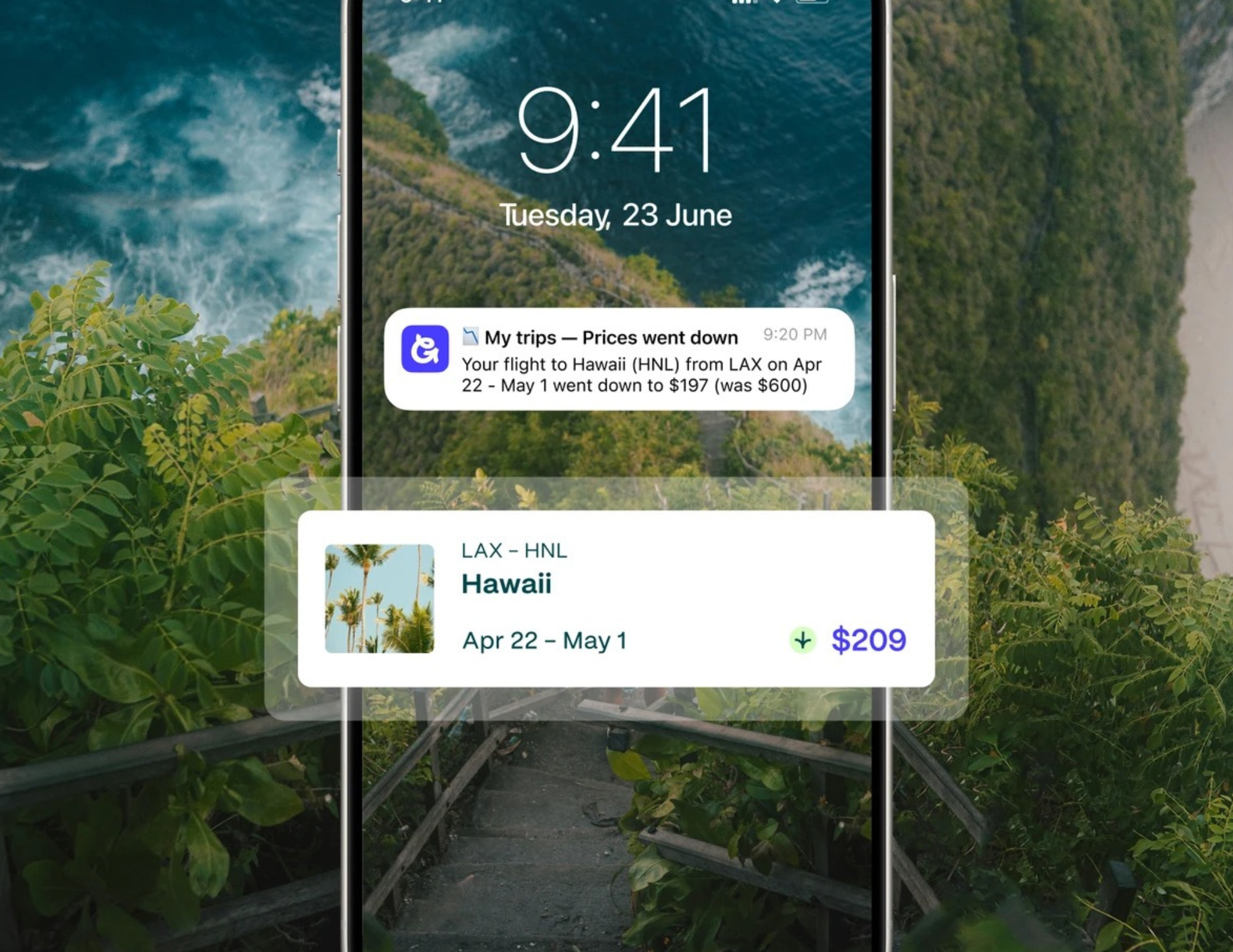
Going can be useful for that kind of planning.
Going is the company formerly known as Scott’s Cheap Flights. It focuses on flight deal alerts, including discounted fares and mistake fares, and sends alerts through email and its app based on the airports and trip preferences you choose. The company describes its system as a mix of deal tracking and human review, and its app includes customizable alerts based on trip preferences.
I like this kind of tool because it can help you think differently.
Instead of saying, “I have to fly to this one city on this one date no matter the price,” you can watch for deals and let a good fare open up a route. Maybe you thought you were going to Paris, but a better deal to Lisbon, Madrid, Amsterdam, Rome, or London makes more sense. From there, you can use AI to build an itinerary around that arrival city.
Try this prompt after finding a flight deal:
Flight Deal Planning Prompt:
I found a flight deal to [destination] for [dates]. Help me decide if this is a smart starting point for my trip. Consider hotel prices, transportation, route options, weather, visa or entry rules to verify, and whether this destination fits my travel style.
A cheap flight is only a win if the rest of the trip still works.
Before booking, check the airline, baggage rules, arrival airport, layover length, cancellation terms, and whether the destination fits your budget once you land.
For Europe routes, read my How to use AI to plan a Europe trip guide before locking in flights.

Best App for Hotels and Apartments: Booking.com
Where you stay can change the whole trip.
A hotel in the wrong area can make every day harder. A cheaper apartment far from everything can cost more once you add transportation and lost time. A central stay can be worth it if it gives you easier access to food, transit, sightseeing, and rest breaks.
Booking.com is one of the most useful tools for comparing hotels, apartments, guesthouses, aparthotels, and longer-stay options. I like using it after I already have a general idea of which neighborhood makes sense. That way, I am not just scrolling randomly across an entire city.
__LWV_RAW_HTML_EMBED_64__
Before booking, check:
Recent reviews
Map location
Cancellation policy
Distance to public transportation
Elevator access
Air conditioning or heating
Kitchen or fridge access
Laundry options
Wi-Fi reviews
Room size
Extra fees or city taxes
Check-in and checkout times
Noise complaints
Family room options if needed
Workspace setup if working remotely
Booking.com is also useful for multi-city trips because you can compare stays across several destinations and keep reservations organized.
AI can help before you even open the app. Ask:
Hotel Area Prompt:
Help me choose the best area to stay in [destination]. My priorities are [walkability/public transportation/food/budget/quiet streets/family-friendly areas/digital nomad setup]. Compare the best neighborhoods and tell me which area fits my travel style best.
After AI narrows the neighborhoods, Booking.com helps you see what is actually available for your dates and budget.
For more help with this step, read my How to use AI to choose where to stay guide.
Best App for Mobile Data Abroad: Airalo
Mobile data is one of the first things I think about before an international trip.
You need data for maps, hotel messages, rideshare apps, translation, bank apps, train updates, restaurant searches, tickets, and last-minute changes. If you are using AI while traveling, mobile data becomes even more useful because you can adjust plans while you are actually out in the city.
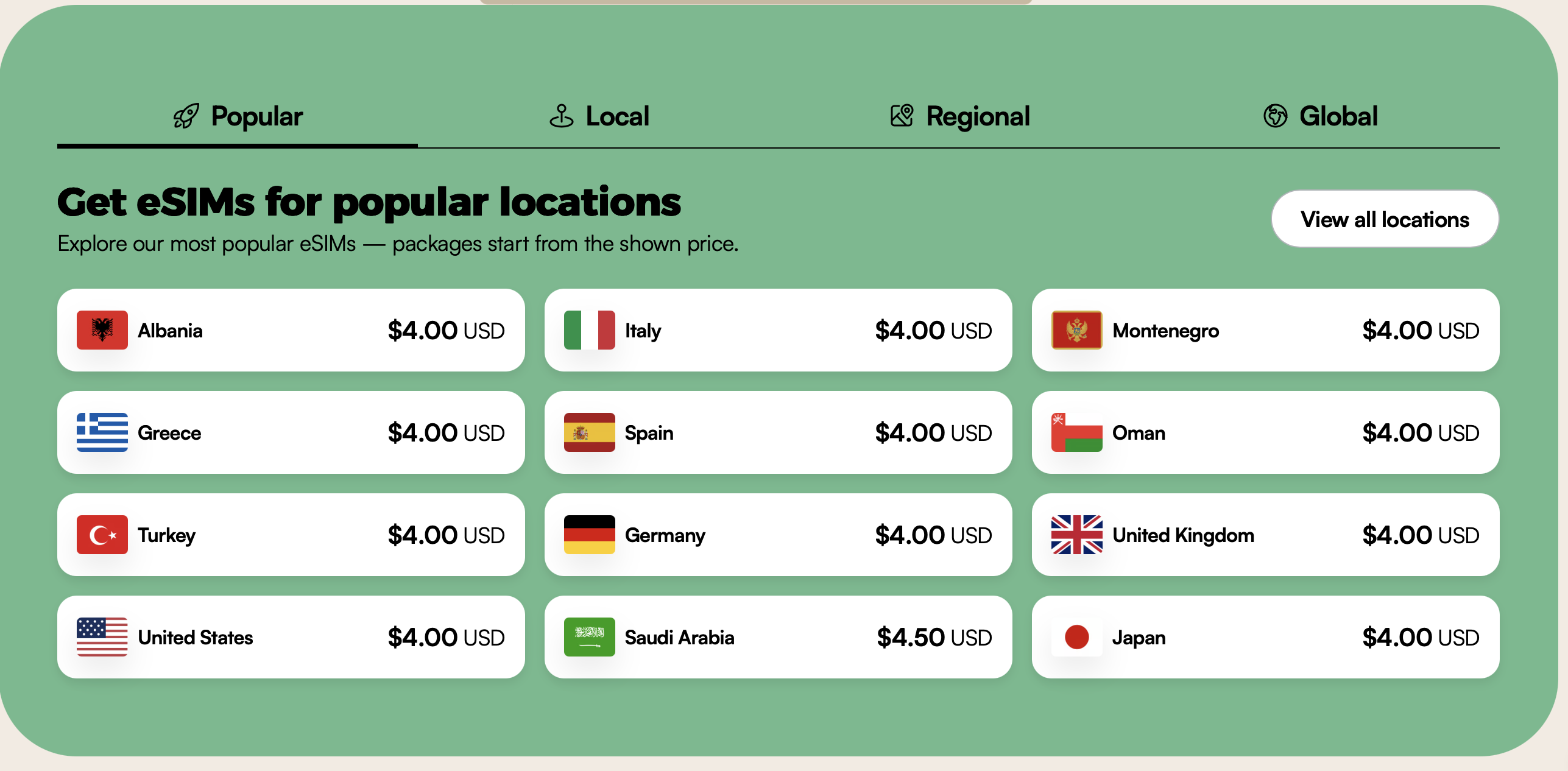
Airalo is an eSIM marketplace that offers local, regional, and global eSIM options. Airalo says it provides eSIMs for 200+ countries and regions, which makes it especially useful for international trips and multi-country routes.
The biggest benefit is convenience.
Instead of landing in a new country and searching for a SIM card kiosk, you can set up an eSIM before or during your trip and have data ready when you arrive. This is helpful for late-night arrivals, family travel, digital nomad stays, and Europe routes where you may be moving between countries.
Before buying any eSIM, check:
Whether your phone supports eSIM
Whether your phone is unlocked
Which countries the plan covers
How much data is included
How long the plan lasts
Whether hotspot is allowed
Whether it is data-only
When the plan activates
Whether you can top up
If you are traveling through more than one country, compare local, regional, and global options. A country-specific eSIM may be fine for a one-country trip. A regional plan may be better for a Europe route. A global plan may be useful if you are moving across different parts of the world.
For a deeper breakdown, read my How to stay connected while traveling internationally guide.

Best App for Maps and Navigation: Google Maps
Google Maps is one of the travel apps I use the most.
It helps with walking directions, public transportation, restaurants, grocery stores, attractions, reviews, opening hours, saved places, and figuring out what is near you. I like saving places before a trip so I can see how everything is grouped on the map.
That is especially helpful when building an itinerary.
If your saved places are scattered across the city, you can see right away that the day may not flow well. If several places are close together, you can build a neighborhood-based day instead of wasting time going back and forth.
Before your trip, use Google Maps to:
Save your hotel
Save restaurants and cafes
Save attractions
Save grocery stores
Save transportation stations
Download offline maps if needed
Check walking distances
Check public transportation routes
Read recent reviews
Look at neighborhood layout
Offline maps are worth downloading before an international trip. They do not replace mobile data completely, but they can help if your signal drops or your eSIM is not working yet.
Google Maps is also helpful with AI planning. You can ask AI to group your itinerary by neighborhood, then check the route on the map before trusting it.
Try:
Map Check Prompt:
Review this itinerary and tell me if the stops are grouped logically by neighborhood. Point out where I may be backtracking or spending too much time in transit.
Then open Google Maps and verify the route yourself.

Best App for Translation: Google Translate
Translation apps can make international travel much easier.
Google Translate is helpful for menus, signs, transportation instructions, grocery labels, short conversations, and basic travel phrases. The camera translation feature can be especially useful when you are trying to read a menu, ticket machine, medicine label, or sign.
Before your trip, download the language for offline use if available. That way, you have some translation help even if your data is weak.
Use translation apps for:
Menus
Transportation signs
Grocery shopping
Pharmacy visits
Hotel communication
Basic phrases
Ticket machines
Directions
Restaurant questions
I still think it is respectful to learn a few basic phrases before visiting a country. Hello, thank you, excuse me, please, and do you speak English can go a long way. Translation apps are helpful, but they should not replace basic courtesy.
AI can also help you prepare phrases before you arrive.
Try:
Travel Phrase Prompt:
Give me useful travel phrases in [language] for restaurants, transportation, hotels, grocery stores, emergencies, and polite greetings. Include pronunciation help and the English meaning.
That is a simple way to feel a little more prepared before landing.
Best App for Money Abroad: Wise
Money gets more complicated when you travel internationally.
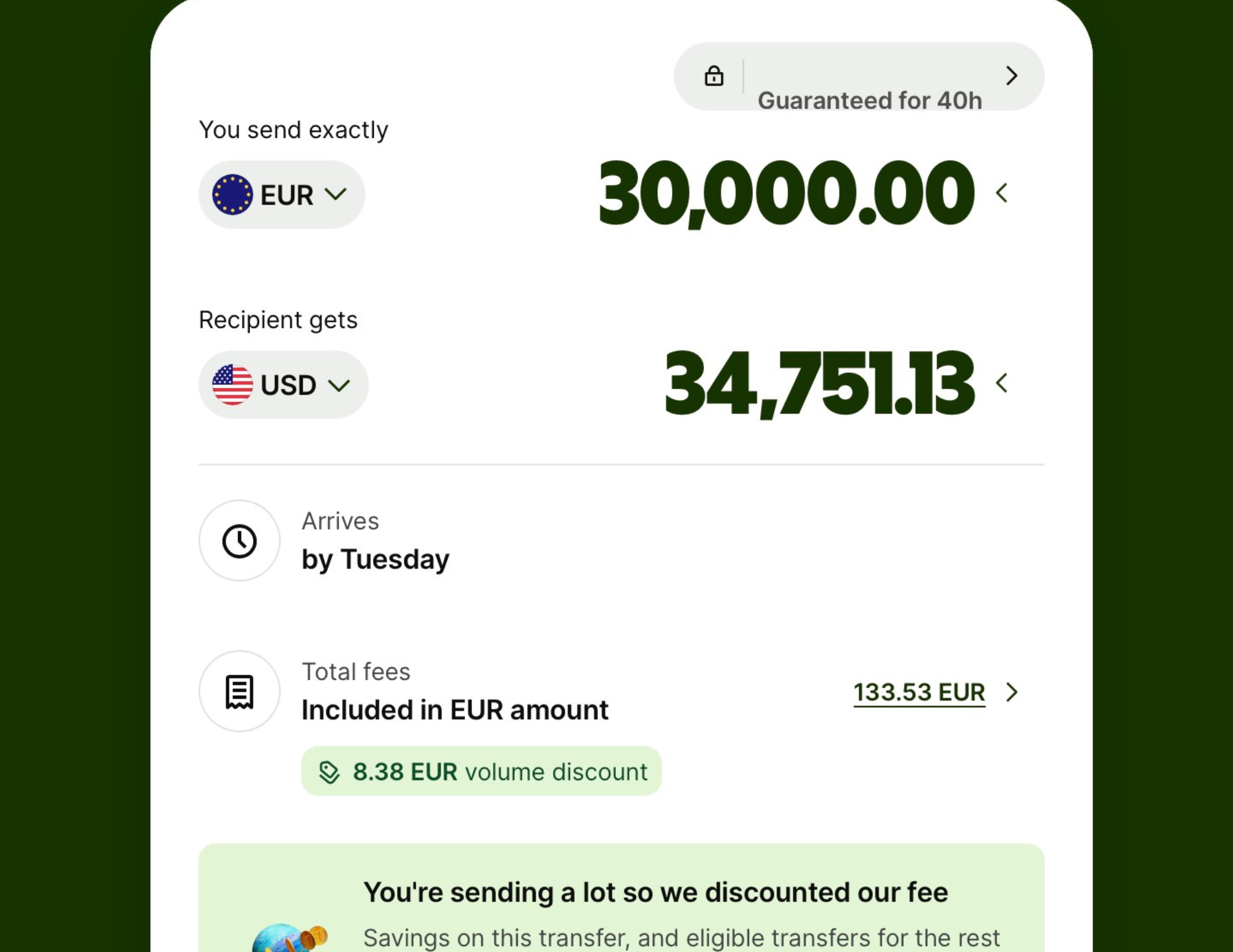
You may deal with different currencies, transfers, exchange rates, international fees, ATM withdrawals, card acceptance, and payment apps that work differently by country. For long-term travelers, digital nomads, and people moving between countries, it helps to have a money setup that does not rely on one card or one bank account.
Wise is a financial technology company focused on international money transfers and multi-currency money management. It was formerly known as TransferWise and is used for sending, holding, and converting money across currencies.
Wise can be useful if you:
Travel often
Move between currencies
Send money internationally
Receive international payments
Want a backup money option
Need to hold more than one currency
Are planning a longer stay abroad
I would still travel with backup cards and more than one way to access money. Cards can get blocked. ATMs can fail. Payment systems can vary by country. Some places are card-heavy, while others still require cash more often.
Before traveling, check:
Foreign transaction fees
ATM fees
Daily withdrawal limits
Card acceptance in your destination
Backup card options
Bank app access abroad
Two-factor authentication
Currency needs
Emergency cash plan
AI can help you build a money checklist before your trip.
Money Abroad Prompt:
Help me create a money plan for traveling to [destination]. Include currency, ATM access, card acceptance, backup cards, cash needs, Wise or multi-currency tools, bank app access, and fees I should check before leaving.
For longer trips, money planning matters even more because small fees can add up.

Best App for Tours and Activities: GetYourGuide
Not every activity needs to be booked as a tour.
Some neighborhoods are better explored slowly. Some museums are fine on your own. Some viewpoints, markets, and parks do not need a guide. But certain experiences can be better when the transportation, ticket access, or local context is handled for you.
GetYourGuide is useful for comparing tours, day trips, food tours, walking tours, museum tickets, skip-the-line entries, cooking classes, boat tours, and cultural experiences.
I like using it after I already know what kind of experience makes sense for the trip.
For example, AI can help you decide whether a food tour, day trip, or guided museum visit is worth it. Then GetYourGuide can help you compare actual options, reviews, prices, and availability.
Use this prompt first:
Tour Planning Prompt:
Help me decide which tours or paid activities are worth booking in [destination]. I am interested in [food/history/day trips/museums/wine/nature/culture]. Tell me what is better with a guide, what I can do independently, what should be booked ahead, and what may not be worth the money for my travel style.
A good tour should solve a problem or add something meaningful.
That may mean easier transportation, deeper cultural context, a better food experience, access to a hard-to-reach place, or avoiding long lines during high season.
For family trips, read my Using AI to plan a family trip guide before booking activities. For digital nomad stays, read my How to use AI to plan a digital nomad stay abroad guide so you can choose experiences that fit around your work schedule.

Best App for AI Travel Planning: ChatGPT
AI can be one of the most useful travel planning tools if you ask better questions.
You can use ChatGPT to build itineraries, compare neighborhoods, plan travel days, find food ideas, create packing lists, organize routes, plan around weather, build backup plans, and make sense of a destination before you start booking.
The key is context.
Do not only ask:
“Plan a trip to Italy.”
Ask:
“Help me plan a realistic 10-day Italy trip for a mid-range traveler who wants food, historic neighborhoods, easy train connections, and a slower pace. I do not want to switch cities every two days. Suggest a route with 2 or 3 bases, realistic transit times, good neighborhoods to stay in, and one day trip option from each base.”
That gives AI something better to work with.
Use AI for:
Itinerary drafts
Neighborhood comparisons
Budget planning
Packing lists
Travel day checklists
Food research
Tour decisions
Rainy-day backups
Family pacing
Digital nomad routines
Schengen route brainstorming
Questions to verify before booking
AI should not replace fact-checking. Opening hours, ticket rules, visa rules, transportation schedules, and restaurant details can change. Always verify the important details before you book or rely on them.
For copy-and-paste prompts, read my Best AI prompts for travel planning guide.

Best App for Organizing Your Trip: Google Travel and Gmail
If you use Gmail, Google can automatically pull together some travel reservations like flights and hotels, which can make the planning easier to find later. Google has also continued adding more travel planning and AI-related tools into its travel ecosystem, including trip planning features connected to Search and Google Flights.
Even if you do not rely on one app for your entire itinerary, you need some place where your trip details live.
That could be:
Google Travel
Google Calendar
Gmail folders
Apple Notes
Notion
TripIt
A simple Google Doc
A spreadsheet
Your phone notes app
The tool matters less than the system.
You need easy access to:
Flight details
Hotel addresses
Check-in instructions
Train or bus tickets
Tour confirmations
Restaurant reservations
Travel insurance details
Passport copies
Emergency contacts
Visa or entry documents
eSIM instructions
Airport transfer notes
I like keeping the most important details somewhere I can access offline. Screenshots are not fancy, but they work. If an app will not load, a screenshot of your hotel address, ticket, or eSIM instructions can save you.
AI can help you create a clean itinerary from scattered details.
Try:
Trip Organization Prompt:
Organize my trip details into a simple day-by-day itinerary. Include flights, hotel addresses, check-in times, transportation, tours, restaurant reservations, mobile data notes, and anything I should download or save before arrival.
The more organized your trip details are, the less you have to search when you are tired.

Best App for Local Transportation
The best transportation app depends on the destination.
In some places, Google Maps is enough. In other places, you need a local transit app, train app, rideshare app, taxi app, metro app, or payment app. Before an international trip, I always research what locals and travelers actually use in that destination.
Examples may include:
Uber
Bolt
Grab
FreeNow
Citymapper
Local metro apps
Trainline
Omio
National railway apps
Airport train apps
Local bus apps
Ferry apps
The right transportation app can save time, especially when you land.
Before your trip, ask AI:
Transportation App Prompt:
What transportation apps should I download before visiting [destination]? Include apps for public transportation, taxis, rideshare, trains, airport transfers, buses, ferries, and anything locals commonly use. Tell me which ones are essential and which ones are optional.
This is especially useful in places where Uber is not the main app or where public transit tickets are handled through a local app.
Download the apps before you leave, create accounts if needed, and add payment information while you are still on reliable Wi-Fi. It is much easier to solve those things before arrival than while standing outside an airport or train station.
For China, Thailand, Europe, and other app-heavy destinations, this step can make the whole trip smoother.

Best App for Train and Bus Travel
For multi-city trips, train and bus apps can be just as important as flight apps.
In Europe especially, trains and buses are often part of the route. Some trips work better by train. Some are cheaper by bus. Some are easier by flight. The best option depends on distance, price, luggage, station location, and how much time the full travel day takes.
Apps like Trainline, Omio, FlixBus, national railway apps, and local transit apps can help compare routes, book tickets, and track schedules depending on the country.
AI can help before you book:
Train and Bus Prompt:
Compare the best way to travel from [city] to [city]. Include train, bus, and flight options if relevant. Compare travel time, station or airport convenience, luggage, cost, comfort, and which option makes the most sense for my trip style.
Then verify the route in the actual booking app or official transportation site.
For Europe, do not only compare the ride time. Compare the full travel day. A one-hour flight can take much longer once you add airport transportation, security, baggage, and getting back into the city. A train may cost more but save energy if both stations are central.
For route planning, read my How to use AI to plan a Europe trip guide.

Best App for Travel Insurance
Travel insurance is not the exciting part of trip planning, but it can matter when something goes wrong.
For short vacations, people often think about trip cancellations, delays, lost luggage, and medical emergencies. For long-term travelers and digital nomads, medical coverage, emergency care, and being covered while moving between countries become even more important.
SafetyWing is one option many long-term travelers and digital nomads consider because it is designed around international travel and people moving between countries. Before choosing any travel insurance, read the policy details carefully and make sure it fits your destination, trip length, health needs, activities, and personal situation.
Use AI to help compare what to ask before buying:
Travel Insurance Prompt:
Help me think through travel insurance for a trip to [destination] for [number of days/weeks/months]. Include medical coverage, emergency care, trip interruption, lost luggage, electronics, activities, pre-existing conditions to consider, and what questions I should ask before choosing a plan.
Do not let AI choose the policy for you.
Use it to build a checklist, then read the actual policy details yourself.
Travel insurance is one of those things you hope you do not need, but it can be a relief to have when travel does not go as planned.

Best App for Packing and Pre-Trip Checklists
Packing apps can be helpful, but you can also use AI, Notes, Google Docs, or a simple checklist.
The best packing list is specific to your destination, season, trip length, luggage style, and activities. A generic packing list can make you overpack or forget something important.
Use AI to create your packing list:
Packing Prompt:
Create a practical packing list for a trip to [destination] in [month or season]. I am traveling for [number of days/weeks] and packing [carry-on only/checked bag]. My plans include [activities]. Include clothing, shoes, toiletries, tech, documents, weather-specific items, and anything I should download, charge, or prepare before leaving. Also tell me what not to pack.
For international trips, I would pay special attention to the tech and document side.
Helpful travel items include:
A portable charger for long sightseeing and travel days
A universal adapter with USB-C ports
A tech organizer for cords, chargers, earbuds, adapters, and SIM tools
A luggage scale for budget airlines and multi-city routes
A luggage tracker for checked bags or long travel days
A travel document organizer for passports, cards, tickets, and papers
Noise-canceling earbuds or headphones for flights, trains, buses, and work sessions
A packable day bag for sightseeing days
These are the kinds of items that make the trip smoother without taking over your luggage.

Best App for Documents and Offline Access
International travel comes with documents.
Passports, visas, entry forms, flight confirmations, hotel bookings, train tickets, travel insurance, vaccination records if needed, emergency contacts, and copies of important cards can all matter depending on the destination.
I like having digital copies saved in more than one place.
You can use:
Google Drive
Dropbox
iCloud
Apple Notes
Google Docs
Email folders
A password manager with secure notes
Screenshots saved to your phone
The key is offline access.
If your data does not work right away, you still need your hotel address, check-in details, tickets, and important documents. I usually keep the most urgent details screenshotted in my phone’s photo album and the more sensitive documents stored securely.
AI can help you build a document checklist:
Document Checklist Prompt:
Create a document checklist for my trip to [destination]. Include passport, visa or entry requirements to verify, flights, hotels, travel insurance, emergency contacts, transportation tickets, eSIM instructions, payment backups, and anything I should save offline before departure.
This is a simple step, but it can make arrival day much less stressful.

Best App Setup for Family Trips
Family trips need extra organization.
You may have multiple tickets, passports, devices, bags, food needs, transportation plans, and different energy levels. The right apps can reduce the number of decisions you have to make in the moment.
For family trips, I would prioritize:
Booking.com for family-friendly stays
Google Maps for saved places and directions
Airalo for mobile data
Google Translate for menus and signs
GetYourGuide for tours or activities that make logistics easier
A notes app for the day-by-day plan
A transportation app for the destination
A document storage app for passports and tickets
A packing checklist
Streaming or entertainment apps for travel days
AI can help build a family-specific app checklist:
Family Travel App Prompt:
Help me prepare the best app setup for a family trip to [destination]. Include apps for maps, transportation, mobile data, translation, food, tickets, accommodation, entertainment, documents, and travel day organization.
The most important thing is making sure everything is downloaded, logged in, and ready before the travel day starts.
For more family-specific planning, read my Using AI to plan a family trip guide.

Best App Setup for Digital Nomads
Digital nomads need a different app setup because the trip includes work.
You may need communication apps, banking apps, project tools, cloud storage, a VPN, Wi-Fi testing tools, coworking apps, eSIM apps, travel insurance documents, and a way to organize longer-stay details.
For digital nomads, I would prioritize:
Airalo or another mobile data app
Wise for money and currencies
Booking.com for longer stays
Google Maps for daily life
Google Translate
A VPN if you use public Wi-Fi often
Cloud storage
Password manager
Work communication apps
Calendar app
Travel insurance documents
Coworking or cafe research tools
Going if your flights are flexible
AI planning tools for weekly routines and route planning
Before booking a longer stay, use AI to create a work setup checklist.
Digital Nomad App Prompt:
Help me prepare my phone and laptop for a digital nomad stay in [destination]. Include apps for mobile data, Wi-Fi backup, money, accommodation, transportation, translation, coworking, travel insurance, work communication, documents, and daily life.
For a full breakdown, read my How to use AI to plan a digital nomad stay abroad guide.

My Simple International Travel App Setup
If I were setting up my phone for an international trip, I would keep it simple.
First, I would make sure I had my flight app and Going if I was still watching for deals.
Then I would use Booking.com to manage hotel or apartment bookings.
I would set up Airalo or another eSIM before departure so mobile data was ready when I landed.
I would save my hotel, airport, train station, restaurants, and main sights in Google Maps.
I would download Google Translate and the local language if offline translation was available.
I would make sure Wise, my bank apps, and backup payment options were ready.
I would download any local transportation apps I needed.
I would keep tickets, hotel addresses, travel insurance, and important documents accessible offline.
Then I would use AI to create a final pre-trip checklist so I could catch anything I missed before leaving.
That setup is not complicated, but it covers the basics.
Flights.
Stay.
Maps.
Data.
Money.
Translation.
Transportation.
Documents.
Insurance.
Backup plan.
That is usually enough to make arrival and travel days feel much smoother.

Final Thoughts: The Best Travel Apps Make the Trip Easier, Not Busier
The best travel apps are not the ones that make you download more and more things.
They are the ones that solve real travel problems.
Going can help you watch for better flight deals before choosing a route. Booking.com helps you compare real stays and neighborhoods. Airalo helps you land with mobile data ready. Google Maps helps you move through the city. Google Translate helps when language becomes a barrier. Wise helps with money abroad. GetYourGuide helps when a tour, ticket, or guided experience adds value. SafetyWing can help long-term travelers think through travel medical coverage. AI can help you organize the whole plan.
You do not need every app for every trip.
You need the ones that match the way you are traveling.
__LWV_RAW_HTML_EMBED_63__
Before your next international trip, set up your phone before you leave. Download what you need. Log in. Save your reservations. Screenshot the essentials. Download maps. Prepare your mobile data. Make sure your money apps work. Keep your important documents somewhere you can access offline.
A little prep before departure can save a lot of stress after arrival.
Because once you land, you do not want to be fighting with your phone.
You want to be moving through the trip with more confidence, fewer surprises, and enough space to actually enjoy where you are.

Cavetta is the creator of LifeWithVetta.com and has been traveling the world full time since 2020. She has visited more than 60 countries while worldschooling her son and documenting what it really takes to live abroad. Her guides focus on travel, moving abroad, digital nomad life, and designing a life beyond the traditional path.
